
Introduction to HTML: Elements, Tags, Structure & HTML5 Features
Introduction to HTML: Elements, Tags, Structure & HTML5 Features
What is HTML?
'HTML' stands for 'HyperText Markup Language'. It is the standard markup language used to create and structure content on the web. Every website you visit is built using HTML in some form. It's not a programming language; rather, it's a way to tell the browser how to display text, images, links, and more.
HTML Elements
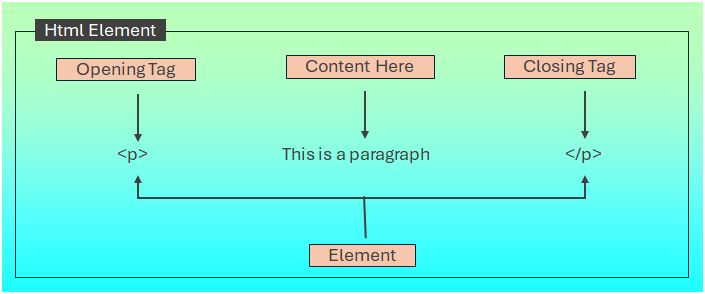
An 'HTML element' is a piece of content wrapped in a pair of tags. It usually includes a start tag, content, and an end tag.
Example 📝
❑ <!DOCTYPE html>
<html>
<body>
<p>This is a paragraph.</p>
<p>This is a paragraph.</p>
<p>This is a paragraph.</p>
<p>This is a paragraph.</p>
</body>
</html>
Output 📌
This is a paragraph.
This is a LikYou can Try the above code by changing the values in our user-friendly code editor by clicking the "Try It" button and see the output of the same.
In the above example:
- '<p>' is the start tag
- 'This is a paragraph.' is the content
- '</p>' is the end tag
- Below is the diagram illustrating html element
HTML Tags
'Tags' are the building blocks of HTML. Most tags come in pairs and surround content to define what it is. There are hundreds of tags used for headings, paragraphs, links, images, lists, tables, and more.
Common Tags Include:
- '<h1>' to '<h6>': Headings
- '<p>': Paragraph
- '<a>': Anchor (for links)
- '<img>': Image
- '<div>' and '<span>': Layout and inline content
Basic HTML Structure
Every HTML document follows a basic structure. Here's what a simple page looks like:
Example 📝
❑ <!DOCTYPE html>
<html lang="en">
<head>
<meta charset="UTF-8">
<meta name="viewport" content="width=device-width, initial-scale=1.0">
<title>My First HTML Page</title>
</head>
<body>
<h1>Welcome to My Website</h1>
<p>This is my first HTML page.</p>
</body>
</html>
Sections Explained:
- '<!DOCTYPE html>': Declares the document type
- '<html>': Root element
- '<head>': Contains metadata
- '<title>': Sets the browser tab title
- '<body>': Holds the visible content of the page
Versions of HTML
HTML was created by 'Tim Berners-Lee' in 1991. It has evolved through multiple versions:
- 'HTML 2.0' (1995): First official version
- 'HTML 3.2' (1997): Added scripting and tables
- 'HTML 4.01' (1999): Introduced CSS support
- 'HTML5' (2014): Modern version with multimedia, forms, and semantic tags
HTML5 Features
'HTML5' introduced many new elements and capabilities that make web development easier and more powerful:
New Semantic Elements
HTML5 introduced new semantic elements that enhance the structure and meaning of web content. These elements, such as `<article>`, `<section>`, `<header>`, and `<footer>`, provide clearer context for both developers and search engines, improving accessibility and SEO. By using these tags, developers can create more meaningful and organized web pages, allowing for better content management and user experience.
Use '<header>', '<footer>', '<article>', '<section>' tags for Better content organization
Multimedia Support
HTML5 provides strong multimedia capabilities, supporting smooth integration of audio and video elements onto web pages. This feature obviates the use of third-party plugins, enabling developers to build rich, interactive experiences that maximize user engagement. With native support for multiple formats and controls integrated into the code, HTML5 simplifies the process of embedding multimedia content, making it more efficient and accessible for creators and users alike.
Use '<audio>', '<video>' tags to Embed audio and video files
Form Enhancements
HTML5 brought important additions to form controls, enhancing the user experience and functionality. The new input types, including email, date, and range, enable improved data validation and user interaction. Furthermore, functionalities such as placeholder, required, and built-in validation make form submission easier, easier to use, and more intuitive for users. These features do not only promote accessibility but also minimize the necessity for a lot of JavaScript, making development less complicated.
- New input types like 'email', 'url', 'date'
- Placeholder attributes
Graphics and Animation
HTML5 provides strong graphics and animation capabilities, which can be used to produce dynamic visual content within the browser. Through the Canvas API and support for SVG, it provides complex designs and quality animation without the intervention of external plugins. This boosts user interaction and enriches the experience on different devices.
- '<canvas>' for drawing
- SVG support
Offline and Storage
- Web Storage ('localStorage', 'sessionStorage')
- Offline applications
Why Learn HTML?
- It's the 'foundation' of every website
- Easy to learn and apply
- Essential for 'SEO' and 'web accessibility'
- Works with 'CSS' and 'JavaScript' for full web development
Other Important HTML Topics
- HTML Attributes: The HTML Attributes add extra information to tags (e.g., 'href', 'src', 'alt')
- HTML Comments: The Comments are used to add notes without affecting code ('<!-This is a comment -->')
- HTML Entities: The HTML Entities is used to display special characters ('©', '<', etc.)
- Responsive Design: Use HTML with viewport meta tag and CSS media queries
- Accessibility: Use proper tags for screen readers and usability
Conclusion
HTML is the 'starting point' of your journey into web development. It gives structure to web content and sets the stage for styling and interactivity using 'CSS' and 'JavaScript'. Whether you're creating a blog, a company site, or an app, mastering HTML is the first essential step.
Published on Thursday, 13 November, 2025